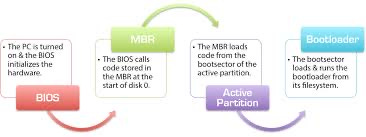
“The Booting Process: How a Computer Comes to Life"

When the power button is pressed, the current from electricity flows through SMPS and then the Switch Mode Power Supply is activated. The SMPS provides the necessary power to the motherboard and other connected components. The current flows to the Advanced Configuration and Power Interface (ACPI) on the motherboard, which distributes power to the various hardware components. This initial power management ensures that every part of the system receives the correct voltage.
Once powered, the Central Processing Unit (CPU) begins its initialization. The CPU conducts a self-check known as the Power-On Self-Test (POST) to verify that it is functioning correctly. During POST, the CPU looks for any garbage values or residual data and clears them. This ensures that the CPU starts in a clean and stable state.
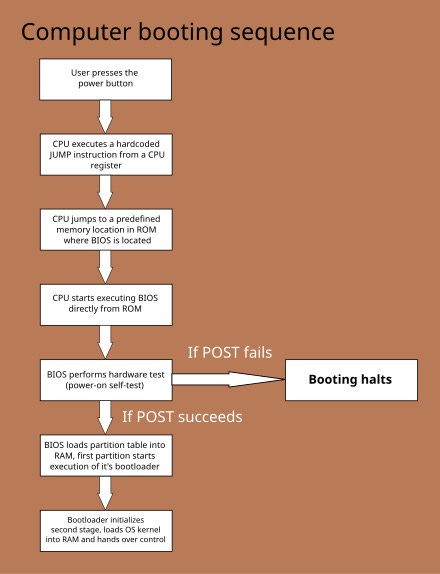
The next step involves memory verification. The CPU accesses the primary memory (RAM) and confirms the existence of the 1 MB boundary,a specific region of RAM where the CPU initiates its operations. After this verification, the CPU accesses the Boot ROM, which contains a booting program. This program is loaded into RAM under the 1 MB boundary, occupying 64 KB of space.
Following this, the CPU loads the BIOS (Basic Input/Output System) ROM and the Video ROM into memory. The BIOS is responsible for managing essential hardware functions and contains the fundamental code needed for system startup. The Interrupt Vector Table (IVT) is then created in the first 1 KB of memory. This table maps addresses to Interrupt Service Routines (ISRs), which are functions stored in the BIOS to handle hardware interrupts such as keyboard input or USB connections. The CPU sets up the IVT with the help of the operating system, ensuring that interrupts are processed efficiently.
Once the IVT is created, the BIOS data is loaded above it. At this stage, the CPU searches for a boot sequence in the BIOS and examines the Boot ROM for a bootable program. The system identifies a bootable program by the presence of a bootstrap the Master Boot Record (MBR)typically located in the first 440 bytes of the disk's initial 446-byte of first 512 bytes of the initial 1024 bytes of disk.
If a bootstrap is found, the CPU activates the operating system's bootloader, which begins loading the operating system into RAM. Initially, the OS is loaded into the real mode limited to the 1 MB memory boundary. After understanding its memory layout and the functions of the BIOS, boot ROM, and Video ROM, the CPU transitions to protected mode.This transition allows access to the entire RAM and advanced memory management features.
In protected mode, the operating system allocates virtual memory to each process. This ensures that each process operates within its assigned memory space, preventing interference with other processes. Virtual memory creates the illusion of exclusive memory allocation for each process, enabling the system to handle multiple tasks simultaneously. This multitasking capability is a defining feature of modern computing.
Through these intricate steps, the booting process initializes the hardware and software, ensuring that the computer is ready to run applications and handle user commands.